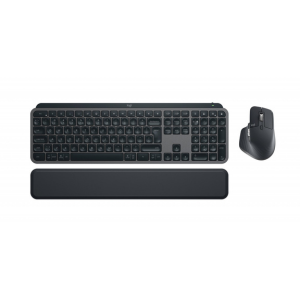
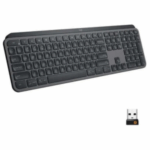


LOGITECH MX KEYS S COMBO
KSh 31,000.00 Original price was: KSh 31,000.00.KSh 30,550.00Current price is: KSh 30,550.00.
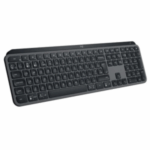
The Logitech MX Keys S Combo delivers professional-grade typing and navigation performance with the MX Keys S keyboard and MX Master 3S mouse. Designed for speed, comfort, and precision, this combo supports smart illumination, cross-device control, and silent operation—perfect for multitaskers and creators seeking premium wireless productivity.
- Order now and receive your order within 48hrs
Countrywide Shipping
Money Back Guarantee
Contact us any time
Secure Payment
Overview
⌨️ LOGITECH MX KEYS S COMBO – Performance Wireless Keyboard and Mouse Set
The Logitech MX Keys S Combo is the ultimate productivity duo—pairing the MX Keys S Wireless Keyboard with the MX Master 3S Mouse. Engineered for precision, speed, and comfort, this set empowers professionals and creators with seamless performance across multiple devices. Smart illumination, customizable shortcuts, and fluid tracking come together to redefine your workspace.
🔹 Key Features
-
Includes the MX Keys S keyboard and MX Master 3S mouse.
-
Smart backlighting that automatically adjusts to ambient light.
-
Multi-device pairing via Bluetooth or Logi Bolt receiver.
-
Flow cross-computer control—move cursor, files, and text between devices.
-
USB-C quick charging with up to 10 days of battery life (or 5 months with backlight off).
-
Silent yet tactile typing with Perfect Stroke keys.
-
Ultra-precise 8,000 DPI sensor for all-surface mouse tracking.
-
Compatible with Windows, macOS, ChromeOS, and Linux.
Technical Specifications
| Feature | Details |
|---|---|
| Keyboard Model | Logitech MX Keys S |
| Mouse Model | Logitech MX Master 3S |
| Connectivity | Bluetooth Low Energy / Logi Bolt USB Receiver |
| Backlighting | Automatic smart illumination |
| Battery (Keyboard) | Up to 10 days (5 months without backlight) |
| Battery (Mouse) | Up to 70 days per charge |
| Charging Port | USB-C |
| Compatibility | Windows, macOS, ChromeOS, Linux |
| Software | Logi Options+ |
| Color | Graphite |
Installation and Management
It is easy to set up—connect both devices via Bluetooth or the Logi Bolt receiver. Install the Logi Options+ software to customize keys, gestures, and shortcuts. With Logitech Flow, you can work seamlessly between computers, transferring files and text with a simple drag-and-drop.
🔗 Useful Links
-
For more Logitech keyboards and combos, click here.
-
Visit the official Logitech product page: Logitech MX Keys S Combo.
-
Download the product datasheet: MX Keys S Combo Datasheet PDF.


Reviews
There are no reviews yet.