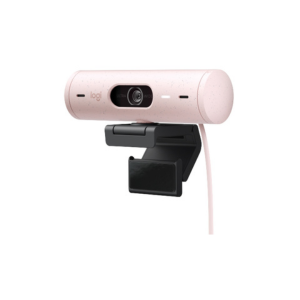
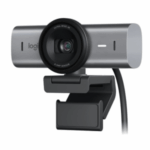


LOGITECH BRIO 500 ROSE
KSh 19,000.00 Original price was: KSh 19,000.00.KSh 18,500.00Current price is: KSh 18,500.00.
The Logitech BRIO 500 Rose delivers Full HD 1080p clarity, dual noise-reducing mics, auto-framing, and a stylish Rose design. Perfect for professionals and content creators seeking high-quality video and modern aesthetics.
- Order now and receive your order within 48hrs
Countrywide Shipping
Money Back Guarantee
Contact us any time
Secure Payment
Overview
🎥 LOGITECH BRIO 500 ROSE – Full HD 1080p Webcam with HDR & Auto-Framing
The Logitech BRIO 500 Rose is a premium Full HD webcam designed for professionals, streamers, educators, and remote workers who want superior video quality with modern aesthetics. With sharp 1080p video, HDR light correction, auto-framing, dual noise-reducing microphones, and a stylish Rose finish, this webcam delivers clarity and performance in any lighting environment. Whether you’re presenting in a conference, streaming from home, or engaging in creative collaboration, the BRIO 500 ensures you look and sound your best.
🔹 Key Features
-
Full HD 1080p (1920 × 1080) at 30 fps and 720p at 60 fps for smooth, detailed video.
-
RightLight 4 HDR technology plus auto-framing (RightSight) to keep you well-lit and centered in the frame.
-
Dual stereo microphones with noise-reduction for clear voice capture even in busy environments.
-
Adjustable field of view: select between 65°, 78°, or 90° for perfect framing.
-
Integrated USB-C plug-and-play connection (adapter included if needed) and detachable mount clip with tripod thread for flexible setup.
-
Stylish Rose color variant with sustainable build using post-consumer recycled plastic.
⚙️ Technical Specifications
| Feature | Details |
|---|---|
| Model Name | Logitech BRIO 500 Rose |
| Video Resolution | 1080p @ 30 fps / 720p @ 60 fps |
| Field of View | 65° / 78° / 90° |
| Focus Type | Autofocus |
| Lens | Glass |
| Microphones | Dual omnidirectional stereo mics |
| Connectivity | USB-C plug-and-play |
| Mounting | Clip-on + tripod thread |
| Compatibility | Windows, macOS, Chrome OS |
| Dimensions (without clip) | 110 × 31.5 × 31.5 mm |
| Weight | ~121 g (with clip & cable) |
⚙️ Installation & Use
To set up the BRIO 500 Rose, simply connect the USB-C cable (or USB-C to USB-A adapter) to your computer. Mount the webcam using the universal clip or tripod thread and select the BRIO 500 in your video-call software. Use the free Logi Tune app to adjust zoom, field of view, image exposure, and enable auto-framing. The privacy shutter ensures peace of mind when not in use. Logitech
🔗 Useful Links
-
Explore more Logitech webcams here.
-
Visit the official product page: Logitech BRIO 500 Rose.
-
Download the official datasheet: BRIO 500 Specifications (PDF).


Reviews
There are no reviews yet.