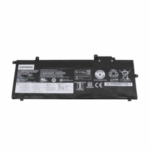



HP Spectre Battery X360 13-ae CP03XL
KSh 5,000.00 Original price was: KSh 5,000.00.KSh 4,500.00Current price is: KSh 4,500.00.
🧾 Short Description
The HP Spectre X360 13-ae CP03XL Battery is a premium 3-cell lithium-ion replacement battery rated at 11.55V and 60.9Wh. Designed to meet OEM standards, it ensures full compatibility with Spectre 13-ae laptops while delivering up to 500 recharge cycles. With integrated safety circuits, a perfect fit, and long-lasting power, it’s the ideal solution for replacing worn-out batteries and keeping your ultrabook running efficiently.
- Order now and receive your order within 48hrs
Countrywide Shipping
Money Back Guarantee
Contact us any time
Secure Payment
Overview
🔋 HP Spectre Battery X360 13-ae CP03XL
Breathe new life into your HP Spectre Battery X360 13-ae series laptop with the high-performance CP03XL replacement battery. Whether your original battery has degraded or you’re experiencing power issues, this genuine-spec battery ensures restored mobility, consistent power delivery, and trusted safety. Designed with premium lithium-ion cells and protected by multiple safety circuits, it’s a smart and reliable choice for on-the-go professionals and students alike.
🔹 Key Features of HP Spectre Battery
-
Compatible with HP Spectre X360 13-ae series (13-ae000 to 13-ae099) for seamless replacement.
-
High-capacity 3-cell lithium-ion build with 60.9 Wh (5275 mAh) for extended uptime.
-
OEM specifications ensure proper fit and function without firmware conflicts.
-
Integrated protection against overcharging, overheating, short circuits, and voltage fluctuations.
-
Easy installation with standard tools—ideal for DIY replacement.
Technical Specifications
| Specification | Description |
|---|---|
| Battery Model | CP03XL / CP03060XL / 929066-421 / HSTNN-LB8E |
| Laptop Series | HP Spectre X360 13-ae Series |
| Voltage | 11.55V |
| Capacity | 5275mAh / 60.9Wh |
| Cell Type | 3-cell Lithium-ion (Li-ion) |
| Recharge Cycles | 300–500 cycles |
| Build Quality | Premium Samsung cells, OEM-grade plastic casing |
| Certifications | CE, RoHS, FCC |
🔹 Installation and Management
Installing the CP03XL battery in your HP Spectre X360 13-ae is straightforward. Power off the laptop, remove the back panel, disconnect the old battery, and install the new one using the same connector. Allow the battery to fully charge and then discharge to calibrate its cycle. Avoid leaving it at 0% or storing it in extreme temperatures to maintain health.
🔗 Useful Links
-
Explore more HP laptop batteries here
-
Visit the official product support page on HP: HP CP03XL Battery – HP Support
-
View the official HP datasheet for compatible models and battery specs: HP Spectre X360 13-ae Maintenance Guide (PDF)


Reviews
There are no reviews yet.