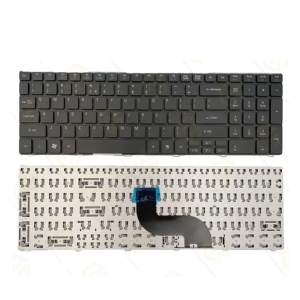


Acer Aspire E5‑573 Keyboard – Non‑Backlit, US Layout
KSh 2,500.00 Original price was: KSh 2,500.00.KSh 2,000.00Current price is: KSh 2,000.00.
High-quality non-backlit replacement keyboard for Acer Aspire E5-573/E5-574 series, US layout, durable keys, easy installation. Ideal for broken or sticky keyboards.
- Order now and receive your order within 48hrs
Countrywide Shipping
Money Back Guarantee
Contact us any time
Secure Payment
Overview
⌨️ Acer Aspire E5‑573 Replacement Keyboard – Non‑Backlit, US Layout
Upgrade your Acer Aspire E5‑573 series laptop with this high-quality OEM/non-OEM replacement keyboard. Engineered for precise fit and consistent performance, this keyboard restores typing efficiency and reliability.
🔹 Key Features
-
Perfect Compatibility – Designed specifically for Acer Aspire E5‑573, E5‑573T, E5‑573G, E5‑574 and related models ifixit.com+15amazon.com+15amazon.com+15.
-
US QWERTY Layout – Standard layout with clear key labels; ideal for English typing needs.
-
Durable & Consistent – Rated for over 10 million keystrokes; long-lasting ABS keycaps .
-
Easy Installation – Plug-and-play replacement with no soldering—connects via original ribbon cable.
-
Non-Backlit Design – Energy-saving and perfect for everyday use (backlit variants also available separately) ebay.com+3laptopkeyreplacements.com+3community.acer.com+3.
Technical Specifications
| Feature | Details |
|---|---|
| Model Compatibility | Acer Aspire E5‑573, E5‑573T, E5‑573G, E5‑574 series |
| Layout | US QWERTY, Non-Backlit |
| Material | ABS plastic keycaps, ferrite underlay |
| Lifespan | ≥10 million keypresses |
| Connector | Flexible ribbon cable (OEM matching) |
| Frame/Bezel | Includes top case/palm rest (unit dependent) |
| Warranty | 6–12 months typical (varies by supplier) ifixit.com+15electrobitsa.com+15amazon.com+15ifixit.com+15laptopkeyreplacements.com+15laptopkeyreplacements.com+15quikfixlaptopkeys.com+1uk.pinterest.com+1amazon.com+7ebay.com+7techhypermart.com+7ebay.com+2gotlaptopparts.com+2ebay.com+2 |
Use & Installation
-
Power off the laptop and remove the battery.
-
Harness screwdriver to remove bezel and old keyboard.
-
Disconnect the ribbon cable.
-
Insert and secure the new keyboard in place—snap bezel back.
-
Power on and verify key functionality.
Complete replacement guides are available via Acer community threads laptopkeyboard.com+3community.acer.com+3ifixit.com+3laptopkeyreplacements.com+1laptopkeyreplacements.com+1quikfixlaptopkeys.com and iFixit-style tutorials ifixit.com.
🔹 Model Variants
Available in both non-backlit and backlit versions. Part numbers differ (e.g., ACER NK.I1513.00L, AEZRTG00210), so match yours before ordering uk.pinterest.com+15electrobitsa.com+15techhypermart.com+15.
🔗 Useful Links
-
Genuine OEM from LaptopKeyboards.com—fast shipping & support gotlaptopparts.com+15laptopkeyboard.com+15in.pinterest.com+15.
-
Glintique international variant with multi-language layouts amazon.com+1amazon.com+1.
-
User experiences on Acer forums regarding backlit upgrade compatibility
- for more similar products visit here


Reviews
There are no reviews yet.